

PAKTop Game Download Unlimited Bonuses & cash Claims
PAKTop is a recently introduced mobile gaming platform that Android users may want to explore for its gaming options and mobile-based experience. People researching the application often look for details about downloading, installation, account registration, gameplay, compatibility, and available settings. This guide brings these topics together to help beginners understand the platform before deciding whether to use it.
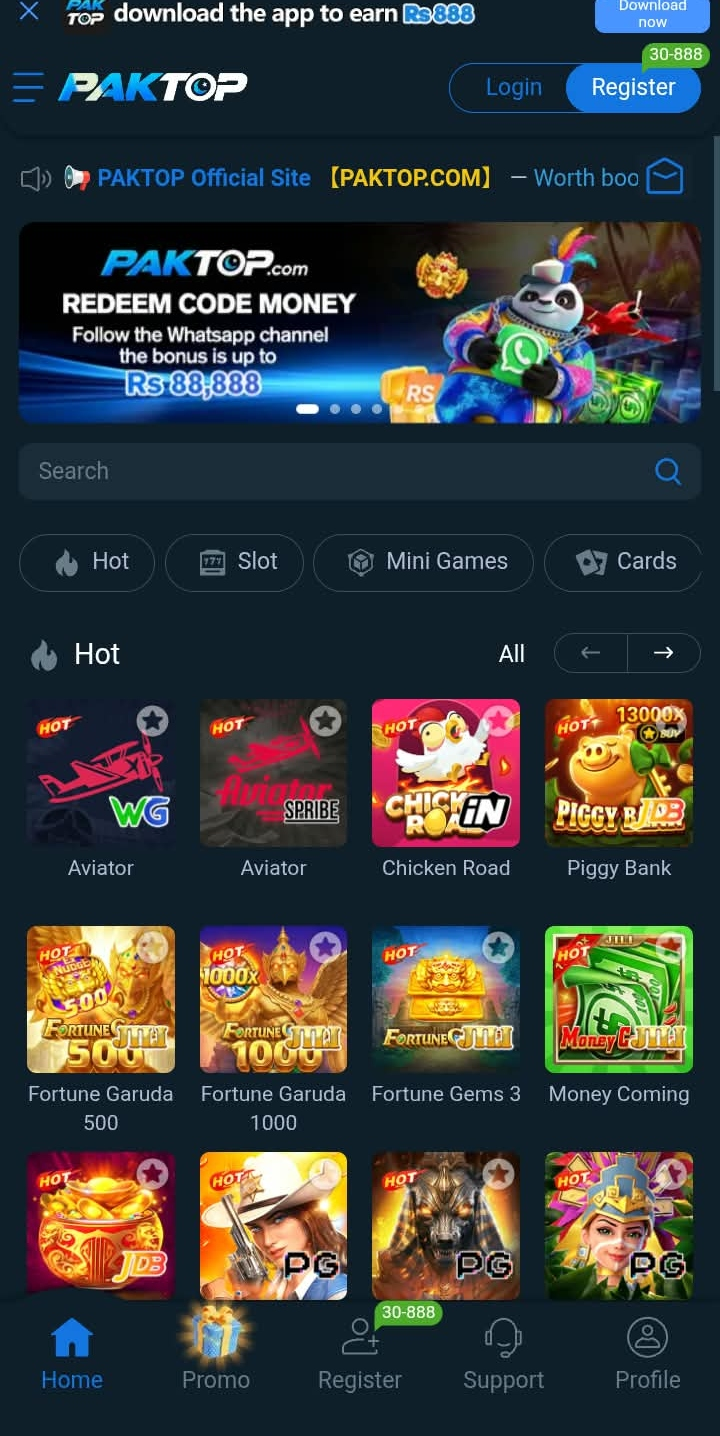
This article is intended for informational purposes rather than promotional claims. Before installing PAKTop, users should check the application’s source, permissions, privacy information, and terms of use. As newer releases may introduce changes, certain options and requirements can vary between application versions.
Table of Contents
- What Is PAKTop Game?
- PAKTop Game Overview
- Why Is PAKTop Getting Attention?
- Main Features of PAKTop
- How to Download PAKTop?
- How to Install PAKTop APK on Android
- PAKTop Android Requirements
What Is PAKTop Game?
PAKTop is a recently introduced Android gaming platform that provides users with a mobile-based gaming experience. Its name gives it a distinctive identity, while its actual functionality, available games, and account options should be confirmed through the current application version.
As a new platform, PAKTop may undergo changes as developers release improvements or address technical issues. Users should therefore check the latest application information instead of assuming that every feature will remain the same over time.
PAK 14 Game
When exploring PAKTop, it is important to look beyond promotional descriptions and understand what the application actually offers. Review its permissions, privacy information, compatibility requirements, and usage conditions before proceeding. Readers interested in other gaming platforms can also explore the Noob Win Game and the XX555 Game for additional information.
PAKTop Game – Download APK, Features, Registration, Installation and Complete Beginner’s Guide
PAKTop Game is a newly introduced mobile gaming platform attracting attention from Android users interested in exploring different gaming experiences. People searching for PAKTop usually want to understand how the application works, how to download and install it, what features it offers, and whether it is suitable for their Android devices.
Before installing a new gaming application, it is important to understand its available features, account requirements, device compatibility, and security considerations. These details can help users make informed decisions instead of relying entirely on promotional descriptions.
This guide explains PAKTop Game in straightforward language, covering its general overview, APK installation process, registration, login, gameplay, possible payment-related questions, privacy considerations, and common technical problems.
Because PAKTop is a newly introduced platform, some application details may change with future releases. Always check the current information provided by the legitimate application source.
What Is PAKTop Game?
PAKTop is presented as a newly launched mobile gaming platform designed primarily for Android users. It provides an application-based environment where users can explore available gaming options through their smartphones.
Unlike traditional games that focus on one specific gameplay experience, multi-game platforms generally organise different activities within a single application. However, the exact selection and availability of games inside PAKTop should be checked in the current version.
For beginners, understanding the application before creating an account is important. Users should explore its interface, read the available instructions, and review its terms and privacy information.
Since the platform is relatively new, its interface, features, and account options may receive changes through future updates.
PAKTop Game Overview
PAKTop is intended for people who prefer accessing mobile gaming platforms directly from their Android devices.
The overall experience depends on several factors, including:
- Android version and device compatibility.
- Application version and available features.
- Internet connection stability.
- Available storage and RAM.
- Account registration requirements.
- Individual game instructions.
A newly launched application may also experience technical improvements during its early development stages. Users should therefore check for updates and follow the latest instructions provided within the application.
Before spending time exploring any new platform, understand its basic functionality and make sure you are comfortable with its terms of use.
Why Are Android Users Searching for PAKTop?
New mobile gaming applications often attract attention because users want to discover alternative platforms and understand what makes them different.
PAKTop has become a search topic for people looking for information about its Android application, installation procedure, and available features.
Some common reasons people search for PAKTop include:
- Learning about the platform.
- Finding information about its Android version.
- Understanding the APK installation process.
- Exploring available gaming options.
- Learning how account registration works.
- Checking device compatibility.
- Understanding security and privacy requirements.
- Finding solutions to common application problems.
However, search interest does not automatically establish an application’s quality, reliability, or safety. These factors should be evaluated separately.
Main Features of PAKTop
The features available in PAKTop should be confirmed through the current application version. Nevertheless, several important areas are worth understanding before using the platform.
1. Mobile-Friendly Design
A mobile-friendly interface helps users navigate an application through a smartphone screen.
Clear menus, readable text, recognizable icons, and properly organized sections can make an application easier to understand.
For beginners, simple navigation is particularly important because it reduces confusion when exploring unfamiliar features.
2. Gaming Environment
The main purpose of a gaming platform is to provide access to entertainment activities.
Users should explore the games actually available inside PAKTop instead of assuming that every gaming category is included.
Different games can have different instructions, controls, objectives, and participation requirements.
3. Account Management
Account management is another important area of a mobile application.
If PAKTop provides account registration, users may find options for accessing their profiles, managing login information, and reviewing available account settings.
Always use a unique password and keep your login details private.
4. Easy Navigation
Navigation determines how easily users can move between different sections.
A properly organized application should make important areas easier to locate, including:
- Home screen.
- Available games.
- Profile information.
- Account settings.
- Notifications.
- Help and support.
- Security options.
The exact menu arrangement may differ depending on the installed version.
5. Application Updates
Updates can help developers improve application performance and address technical problems.
Depending on the release, updates may include bug fixes, compatibility improvements, interface changes, or additional functionality.
Always verify the source before installing an updated APK.
6. Android Compatibility
Compatibility is essential when installing applications outside traditional app marketplaces.
An application may work differently across smartphones because of differences in Android versions, processors, RAM, and available storage.
Checking the current requirements before downloading can help prevent unnecessary installation problems.
How to Download PAKTop APK on Android
Before downloading PAKTop, users should identify a legitimate distribution source.
APK files allow Android users to install applications manually. However, downloading files from unfamiliar websites can introduce security risks.
Follow these general steps:
- Find the legitimate source associated with PAKTop.
- Confirm that the application name is correct.
- Check the available version information.
- Review the application description.
- Examine the developer information, if provided.
- Download the APK only if you trust its source.
- Wait until the download finishes.
- Locate the downloaded file in your phone’s Downloads folder.
- Review the Android installation prompt.
- Continue only after checking the file and requested permissions.
Do not download suspicious files simply because a website describes them as the latest or premium version.
How to Install PAKTop APK on Android
After downloading the APK, the next step is installation.
Android may require permission to install applications from a particular browser or file manager when the application is obtained outside an official app marketplace.
Here is the general installation process.
Step 1: Locate the APK File
Open your smartphone’s Downloads folder and find the PAKTop APK file.
Check its name and make sure it matches the application you intended to download.
Step 2: Open the Installation File
Tap the downloaded APK. Android should display an installation screen if the file is compatible.
Step 3: Review Security Information
Before proceeding, examine the installation information and requested permissions.
Do not approve access that appears unrelated to the application’s purpose without understanding why it is required.
Step 4: Complete Installation
If the source is trustworthy and you are comfortable with the permissions, follow the installation instructions.
Step 5: Open PAKTop
Once installation is complete, locate the application icon and open it.
Follow the instructions displayed on the screen to explore its available features.
PAKTop Android Requirements
The exact Android requirements for PAKTop should be confirmed through the current release information. Since application requirements can change, it would be misleading to provide an unverified minimum Android version or RAM specification.
However, users should consider these important device requirements.
Android Version: Check whether your phone supports the Android version required by the application.
RAM: Sufficient memory helps applications operate smoothly, especially when multiple processes are running.
Storage Space: Keep enough free storage for installation files, application data, and possible updates.
Processor: Older processors may struggle with applications that contain demanding graphical or interactive features.
Internet Connection: Online features may require a stable internet connection.
Battery: Make sure your smartphone has sufficient battery before extended gaming sessions.
Checking these factors before installation can help reduce compatibility problems.
How to Register on PAKTop?
If PAKTop offers an account registration feature, users should create their accounts through the application’s own registration interface.
A general registration procedure may involve the following steps:
- Open the installed PAKTop application.
- Find the Sign Up or Register option.
- Review the information requested.
- Enter the required details.
- Create a strong password.
- Complete any verification process.
- Read the available terms and conditions.
- Submit the registration information.
- Follow the instructions displayed by the application.
The exact registration fields have not been independently confirmed in the supplied information, so follow the actual instructions shown in your version.
Never provide your password or verification code to another person.
How to Log In to PAKTop?
Existing users can use the application’s login option if an account system is available.
The general login procedure is:
- Open PAKTop on your Android phone.
- Select the Login option.
- Enter your registered account information.
- Provide your password.
- Complete any required verification.
- Submit the login details.
- Wait for the application to open your account.
If login fails, carefully check your information before trying again.
Avoid entering account credentials on unfamiliar websites claiming to provide PAKTop login services.
What If You Forget Your PAKTop Password?
Forgetting an account password can happen to anyone.
If PAKTop provides a password recovery option, use the recovery instructions available on its login screen.
Look for an option such as Forgot Password and follow the verification process.
For better account protection:
- Never share your password.
- Do not send verification codes to strangers.
- Avoid using the same password across multiple accounts.
- Do not trust unofficial account recovery services.
- Use only the application’s legitimate recovery process.
If no recovery option is available, check whether the application provides an official support channel.
How to Use PAKTop for the First Time
First-time users should avoid rushing through the application.
Spend a few minutes understanding the interface and identifying the main sections.
Start by checking:
- The home screen.
- Available gaming options.
- Profile and account settings.
- Application notifications.
- Security settings.
- Help information.
- Game-specific instructions.
Once you understand the available options, select a game and read its rules carefully.
This simple approach can make the initial experience easier and help prevent mistakes.
How Does PAKTop Gameplay Work?
Gameplay depends on the individual game available within the platform.
Different mobile games use different controls and objectives. Some may require tapping, while others may involve selecting options, completing challenges, or responding to particular situations.
Before starting any game, understand:
- The main objective.
- Available controls.
- Game instructions.
- Scoring rules, if applicable.
- Participation requirements.
- Any applicable charges or financial conditions.
Never assume that all games inside a platform follow identical rules.
PAKTop Game Categories
Mobile gaming platforms can organize their available games into different categories to make navigation easier.
However, the following descriptions represent general mobile gaming categories, not a verified list of PAKTop’s current game selection.
Casual Games: These generally involve straightforward controls and shorter gaming sessions.
Puzzle Games: Puzzle-based activities involve solving problems, identifying patterns, and completing challenges.
Arcade Games: Arcade-style games often focus on quick actions, reactions, and simple mechanics.
Strategy Games: Strategy games involve planning, decision-making, and considering different possible outcomes.
Competitive Games: Competitive gaming may involve scores, rankings, or comparisons between participants when such features are available.
Always check the actual game library before deciding which category is suitable.
PAKTop User Interface and Navigation
The user interface plays an important role in the overall experience of a mobile application.
A well-organized interface helps users understand where different features are located.
When exploring PAKTop, pay attention to the following areas:
- Main dashboard.
- Navigation controls.
- Available game sections.
- Profile settings.
- Account information.
- Notifications.
- Support options.
If you notice unfamiliar buttons or settings, read their descriptions before selecting them.
Understanding the interface first can make it easier to use the application confidently.
Does PAKTop Support Easypaisa?
Easypaisa is a digital financial service used in Pakistan. Users searching for PAKTop may also want to know whether the platform supports Easypaisa for deposits, withdrawals, or other payment-related activities.
However, the supplied PAKTop information does not confirm whether Easypaisa is supported.
Before using any payment feature, check the application’s actual payment section and read its financial terms.
Important points to consider include:
- Whether Easypaisa is officially listed as a supported payment method.
- Whether the platform provides clear transaction instructions.
- Whether applicable fees are explained.
- Whether withdrawal conditions are clearly stated.
- Whether users can contact an official support channel about payment problems.
Do not send money to personal accounts or unofficial agents based on social media messages.
Also, remember that payment availability does not establish that a gaming platform is trustworthy or that financial returns are guaranteed.
Is PAKTop Safe to Install?
Application safety should be considered before installing any APK file.
A new application’s name or promotional description is not enough to establish whether it is secure.
Users should evaluate several factors before installation.
Download Source: Obtain the APK from a legitimate and trustworthy distribution source.
Developer Information: Check whether the application provides identifiable developer details.
Application Permissions: Review the access requested during installation.
Privacy Policy: Understand how personal and technical information may be collected and used.
Version Information: Check whether the APK matches the expected application release.
Security Warnings: Pay attention to warnings from Android and your device’s security software.
If you cannot verify the file or its source, avoid installing it until you have more reliable information.
PAKTop Privacy Considerations
Privacy is an important part of using any mobile application.
Depending on its design, an application may process account information, device details, technical information, or usage data.
Before registering, review the privacy policy if one is available.
Pay attention to:
- What information is collected.
- Why that information is needed.
- Whether information is shared with other organizations.
- How account information is protected.
- Whether users can request account deletion.
- How long personal information may be retained.
Avoid providing unnecessary personal details.
PAKTop Permissions Explained
Android applications may request access to different device features.
These can include notifications, storage-related functions, network access, and other permissions depending on the application’s functionality.
Users should not approve every permission automatically.
Instead, consider whether the requested access is relevant to the feature being used.
If a permission seems unusual or unnecessary, investigate it before continuing.
You can also review and manage many application permissions through your Android phone’s Settings.
Common PAKTop Installation Problems and Solutions
Some Android users may experience technical difficulties while downloading or installing a new application.
Here are common problems and practical troubleshooting suggestions.
PAKTop APK Is Not Installing
Possible reasons include:
- Insufficient storage.
- Incompatible Android version.
- Damaged installation file.
- Incorrect APK package.
- Installation restrictions.
Check the file source, available storage, and device compatibility before trying again.
PAKTop Application Keeps Crashing
Application crashes may result from software bugs, device limitations, outdated versions, or compatibility problems.
Try restarting your phone and checking whether a newer version is available.
PAKTop Is Loading Slowly
Slow loading can be related to an unstable internet connection, device performance, or application-side technical problems.
Try switching to a more stable connection and closing unnecessary background applications.
PAKTop Is Not Opening
First, restart the application and your phone.
If the issue continues, check the Android requirements and application version.
PAKTop Login Is Not Working
Make sure your account information is correct.
If you have forgotten your password, use the official recovery procedure if available.
How to Update PAKTop APK
Keeping an application updated can help improve compatibility and resolve known problems.
Before installing a new version, follow these steps:
- Check the current installed version.
- Find the latest release information from a trusted source.
- Confirm that the update belongs to PAKTop.
- Review the version details.
- Make sure sufficient storage is available.
- Use a stable internet connection.
- Install the update according to the provided instructions.
Avoid modified APK files that advertise unlimited access, unlocked features, or other unverified benefits.
Why Should You Keep PAKTop Updated?
Application updates can be important for maintaining compatibility and improving the user experience.
Depending on the developer’s release, updates may provide:
- Bug fixes.
- Improved stability.
- Performance adjustments.
- Security improvements.
- Interface changes.
- Compatibility improvements.
- Additional functionality.
However, installing every APK file found online is not a safe updating strategy.
Always verify the source and version before updating.
PAKTop Performance on Different Android Phones
The performance of an application can vary significantly between smartphones.
A newer device may offer faster processing, more memory, and better overall responsiveness. An older smartphone may experience delays if its hardware does not meet the application’s requirements.
Several factors influence performance:
Processor: Determines how efficiently the phone handles application tasks.
RAM: Helps manage active applications and background processes.
Storage: Low available storage can affect overall device performance.
Android Version: Older operating systems may have compatibility limitations.
Internet Quality: Connection stability can affect online features.
For better performance, close unnecessary applications, free up storage, and keep your device updated.
PAKTop on Mobile Data
Users who depend on mobile data should understand how applications consume internet resources.
Downloading APK files and application updates may use a noticeable amount of data, depending on their file sizes.
To manage mobile data:
- Check the APK size before downloading.
- Use Wi-Fi for large updates when possible.
- Monitor application data usage.
- Restrict unnecessary background activity.
- Avoid repeated downloads of the same file.
- Check your phone’s data usage settings.
These steps can help users avoid unnecessary internet consumption.
PAKTop and Wi-Fi Performance
A stable Wi-Fi connection can make online gaming more convenient.
However, connection quality depends on more than the internet package speed.
Router performance, network congestion, signal strength, and server responsiveness can also affect the experience.
If the application disconnects frequently, try moving closer to the router or reconnecting to the network.
You can also restart your router if other internet services are experiencing similar problems.
How to Improve Your PAKTop Experience
A smooth experience depends on both application performance and responsible device management.
Consider these practical suggestions:
- Keep enough storage available.
- Close unnecessary background applications.
- Use a stable internet connection.
- Keep Android updated.
- Install verified application updates.
- Read the instructions before playing.
- Review account settings.
- Protect your login information.
- Take regular breaks.
- Avoid suspicious third-party modifications.
Following these habits can help reduce common technical and account-related problems.
PAKTop Game Tips for Beginners
New users should start by learning how the application works.
There is no need to explore every option immediately.
Read the available instructions, understand the controls, and become familiar with the interface.
If a game provides a practice option, use it to learn the basic mechanics.
Most importantly, treat gaming as entertainment rather than a guaranteed source of income.
Never spend money that you cannot afford to lose, and avoid making financial decisions based on promotional promises.
Responsible Gaming With PAKTop
Responsible gaming means maintaining a healthy balance between entertainment and everyday responsibilities.
Set reasonable time limits before starting a gaming session.
Take breaks and avoid playing when you should be studying, working, driving, or sleeping.
If a game involves deposits or financial participation, understand the risks and applicable conditions before taking part.
Remember that gaming outcomes are not guaranteed, and promotional claims should never be treated as proof of financial returns.
Official PAKTop Version vs Modified APK
Users searching for PAKTop may encounter different APK files online.
Some websites advertise modified versions that claim to offer additional features or remove restrictions.
However, the contents of an unofficial APK may have been changed without the original developer’s approval.
This can create security and privacy risks.
For this reason, users should prefer the original application from its legitimate distribution source.
Avoid installing files that request unusual permissions or make unrealistic promises.
PAKTop Account Safety
Protecting your account is an important part of using any online platform.
Follow these basic security practices:
- Create a strong and unique password.
- Never share your login details.
- Keep verification codes private.
- Avoid unfamiliar login websites.
- Review account activity when available.
- Use additional security options if supported.
- Change your password if you suspect unauthorized access.
These practices can help reduce the risk of account misuse.
What to Do If You Suspect an Account Problem
If you believe someone else has accessed your account, take action as soon as possible.
First, use the application’s official password management options to change your password.
Next, review available account security settings and check for unfamiliar activity if the application provides such information.
Do not share account details with strangers offering recovery services.
If the problem continues, contact the application’s legitimate support channel, if available.
PAKTop Customer Support
Customer support can help users understand application features and report technical problems.
If PAKTop provides an official support section, use it to look for assistance with installation, registration, login, or account-related questions.
When reporting an issue, provide relevant technical information, such as:
- Application version.
- Android version.
- Device model.
- Description of the problem.
- Steps that caused the issue.
Never share your password, verification code, or unnecessary sensitive information when requesting assistance.
Advantages and Considerations of PAKTop
Like other newly introduced mobile platforms, PAKTop should be evaluated according to its actual features and performance.
Potential Advantages
- Android-focused application experience.
- Opportunity to explore a new gaming platform.
- Application-based access.
- Potential account management features.
- Possibility of future improvements.
- Mobile gaming convenience.
Important Considerations
- Exact features need to be verified.
- Device compatibility may vary.
- New applications can contain technical problems.
- APK download sources require careful checking.
- Privacy information should be reviewed.
- Payment and withdrawal features should not be assumed.
- Unofficial modified versions may create security risks.
Considering both advantages and limitations helps users make better decisions.
PAKTop vs Other Mobile Gaming Platforms
Choosing a gaming application depends on personal preferences and the quality of the available experience.
Some platforms focus on simple entertainment, while others provide more complex gameplay or different types of activities.
Before choosing PAKTop or another application, compare important factors.
| Comparison Factor | What to Check |
|---|---|
| Game Selection | Available gaming options |
| Interface | Ease of navigation |
| Compatibility | Supported Android versions |
| Performance | Loading speed and stability |
| Security | Permissions and download source |
| Privacy | Information collection practices |
| Updates | Availability of new releases |
| Support | Official assistance options |
There is no reason to assume that one platform is automatically better than another without examining its actual features.
PAKTop and Device Storage
Storage management can affect the overall performance of an Android smartphone.
An APK file may require additional space after installation because applications can create temporary files or download extra data.
If your phone has limited storage, consider removing unused applications and unnecessary files.
You should also maintain sufficient free space for Android system operations and future updates.
PAKTop Battery Usage
Mobile gaming can consume more battery than many basic applications.
Battery usage depends on screen brightness, processor activity, network connectivity, and how long the application remains active.
To manage battery consumption:
- Reduce screen brightness when appropriate.
- Close unnecessary background applications.
- Avoid excessive gaming sessions.
- Keep your phone away from extreme heat.
- Stop using the application if the device becomes unusually hot.
Allow your smartphone to cool down before continuing if it overheats.
PAKTop and Overall Phone Performance
An application’s performance is partly connected to the condition of the smartphone.
Devices with limited RAM, older processors, or insufficient storage may experience slower operation.
For a better experience, restart your device when necessary, install available system updates, and avoid running too many demanding applications simultaneously.
These basic maintenance steps can help your smartphone operate more efficiently.
Troubleshooting PAKTop Step by Step
If PAKTop is not working correctly, follow this simple troubleshooting sequence.
Step 1: Restart the Application
Close the application completely and open it again.
Step 2: Check Internet Connectivity
Confirm that your Wi-Fi or mobile data connection is working.
Step 3: Restart Your Smartphone
Restarting the device can resolve temporary software problems.
Step 4: Check Available Storage
Make sure your phone has enough free space.
Step 5: Check for Application Updates
Verify whether a newer compatible release is available.
Step 6: Review Device Compatibility
Check whether your Android version meets the application’s current requirements.
Step 7: Contact Official Support
If the issue remains unresolved, use the legitimate support channel if one is provided.
Avoid downloading another APK from an unknown source just to solve an installation or performance issue.
PAKTop Download Safety Checklist
Before installing PAKTop, review this checklist:
- Confirm the application’s source.
- Check the application name.
- Verify the available version.
- Review developer information.
- Understand requested permissions.
- Check the privacy policy.
- Look for suspicious download redirects.
- Avoid modified APK files.
- Pay attention to Android security warnings.
- Do not trust unrealistic promotional claims.
If you cannot establish that a file is trustworthy, do not install it.
Frequently Asked Questions About PAKTop
What is PAKTop Game?
PAKTop is presented as a newly launched mobile gaming platform intended primarily for Android users. Its current features should be checked through the available application version.
Is PAKTop available for Android?
PAKTop is presented as an Android-focused platform. Users should confirm the availability and compatibility of its current Android release before downloading.
How can I download PAKTop APK?
Find a legitimate distribution source, verify the application information, and download the APK only when you trust the source.
How do I install PAKTop on my phone?
Locate the downloaded APK, open the installation file, review the Android security information, and follow the installation instructions.
Can beginners use PAKTop?
Beginners can explore the application if their devices support it. Reading the instructions and understanding the interface first can make the experience easier.
How do I create a PAKTop account?
If registration is available, open the application and select its official sign-up option. Follow the information and verification instructions displayed on the screen.
How do I log in to PAKTop?
Use the login option inside the application and enter your registered account information.
Does PAKTop support Easypaisa?
Easypaisa support has not been confirmed in the available PAKTop information. Check the application’s actual payment options and terms before making any transaction.
Is PAKTop free to download?
The current download and access conditions should be checked through the legitimate distribution source. Do not assume that every feature or activity is free.
Does PAKTop require an internet connection?
Online features may require internet access. The exact requirements depend on the application’s functionality and individual games.
Why is PAKTop not installing?
Common reasons include insufficient storage, incompatible Android versions, damaged APK files, and installation restrictions.
Why does PAKTop keep crashing?
Crashes may result from compatibility issues, application bugs, limited device resources, or outdated software.
How can I update PAKTop?
Check the latest release information from a trusted distribution source and install a compatible update.
Is it safe to download a modified PAKTop APK?
Modified APKs can contain unknown changes. Using the original application from a legitimate source is the safer approach.
Can PAKTop work on older Android phones?
Compatibility depends on the application’s current requirements and your device’s hardware. Check the supported Android version before installing.
Can I use PAKTop with mobile data?
Mobile data may work for online features, depending on the application’s requirements and connection stability. Monitor your data consumption when downloading updates.
Is PAKTop suitable for long gaming sessions?
Gaming habits differ between users. Take regular breaks and make sure entertainment does not interfere with sleep, work, studies, or other responsibilities.
Final Thoughts on PAKTop Game
PAKTop is a newly introduced mobile gaming platform that may interest Android users looking for information about a different gaming experience. Before downloading it, users should understand its available features, installation requirements, registration process, and security considerations.
The most important step is verifying the APK source before installing anything on your smartphone. Reviewing application permissions, checking device compatibility, and understanding privacy information can help reduce unnecessary risks.
After installation, take time to explore the interface and read the instructions for each available game. Keep your application updated through a trusted source, protect your account information, and use the platform responsibly.
Ultimately, a good mobile gaming experience should combine convenience, security, and entertainment. Make informed decisions based on verified application information rather than relying on promotional claims or unconfirmed promises.