
Next AI Tools: Find the Best AI Tools for Your Needs
Looking for an AI tool can quickly become confusing. You might need help writing a blog post, creating an image, researching a topic, or building an app. A quick search brings up so many options that choosing the right one becomes a task of its own.
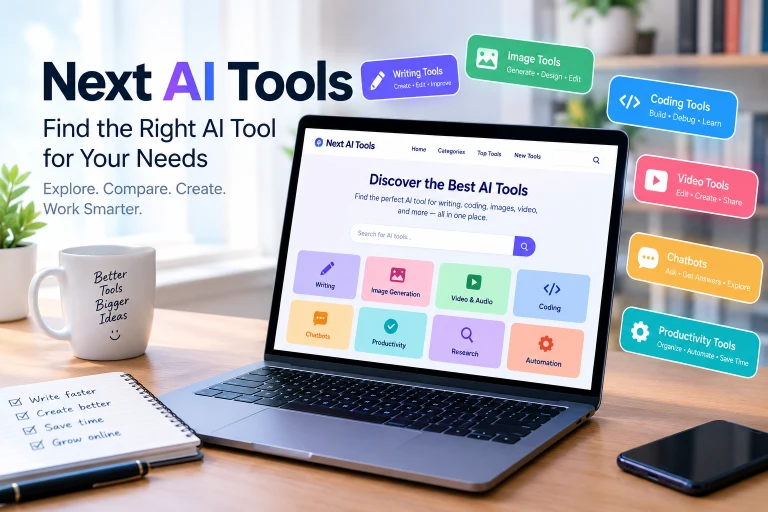
Next AI Tools can help you discover AI applications in one place. The Next AI is an online directory where you can search for tools, browse categories, and explore products for different tasks. You can also look through areas such as writing, image generation, coding, chatbots, video, productivity, and automation.
The useful part is having a starting point. You do not need to know the name of a particular AI product before exploring what is available. However, finding a tool is only half the job. You also need to check whether it does what you need, how much it costs, and whether its results are good enough for your work.
This guide explains how Next AI Tools works, what you can explore, and how to choose an option without wasting time on tools you may never use.
What Is Next AI Tools?
Next AI Tools is a phrase people use when looking for AI applications and directories. The Next AI is a directory built around discovering AI tools rather than relying on a single AI chatbot or application.
Think of it as a starting point for software discovery. You can explore different types of tools, open individual listings, and investigate products that match your goals.
For example, a blogger looking for help with editing can explore writing tools. Someone interested in creating visuals can browse image-generation options, while a developer can look for coding assistants.
The directory is free to browse, according to its official website. That does not mean every product listed inside it is free. Each tool has its own features, pricing, and usage limits, so you should check those details before relying on it.
What Can You Find in The Next AI?
The Next AI groups tools into categories so visitors can explore products by their main purpose. Here are some of the most useful areas to start with.
AI Writing and Content Creation
Writing tools can help with brainstorming, outlining, editing, summarizing, and drafting content. Some are designed for general writing, while others focus on marketing copy, emails, or longer documents.
These tools can be useful when you have ideas but need help organizing them. They can also help you improve a rough draft or find alternative ways to explain something.
If you are choosing a writing tool for a website, do not judge it only by how quickly it produces text. Check factual accuracy, editing requirements, language quality, and how much original input you can add. A fast draft is not automatically a good article.
AI Image Generation and Design
Image-generation tools create visuals from written instructions. Design tools may offer additional features for layouts, graphics, interface design, and other creative work.
These options can help content creators prepare illustrations, explore design ideas, or produce visuals for a project. The results vary from one tool to another, especially when it comes to following detailed prompts, editing existing images, and rendering text accurately.
Before choosing one, decide what you want to create. A tool suited to artistic images may not be the best choice for product mockups or precise design work.
AI Coding and Developer Tools
Coding assistants can suggest code, explain programming concepts, help identify errors, and support developers during software projects. Some tools work inside code editors, while others let users build or experiment with projects through a browser.
Beginners may find these tools useful when learning a new concept. Experienced developers may use them to speed up routine work.
The important thing is to test the output. AI-generated code can contain errors, insecure patterns, or solutions that do not fit your project. Review and test it before using it in a real application.
AI Chatbots and Research Tools
Chatbots can answer questions, explain concepts, help with writing, and support general problem-solving. Research-focused tools may help users investigate topics, organize information, or find relevant sources.
The best option depends on the kind of answer you need. A general chatbot may be suitable for brainstorming, while a research tool that provides clear references may be more helpful when you need to verify a claim.
Do not treat an AI-generated answer as proof that something is true. Check important facts against reliable sources, particularly when accuracy matters.
AI Video, Audio, and Music Tools
Video tools may help create clips, edit footage, generate scenes, or turn scripts into visual content. Audio tools can support transcription, voice generation, sound editing, and music-related tasks.
These applications can be helpful for creators who want to experiment with different formats. However, some tools restrict the length of generated content, the number of exports, or access to higher-quality results.
If you plan to use the output commercially, read the product’s current terms. Do not assume that every generated image, voice, video, or song can be used without restrictions.
AI Productivity and Automation
Productivity tools can help summarize information, organize tasks, and manage everyday work. Automation tools connect tasks or applications so that certain steps happen with less manual effort.
For example, a business might want to organize incoming requests or move information between its work applications. An automation tool may help, provided it supports the required services and actions.
Check permissions before connecting an AI tool to your accounts. It is important to understand what information the tool can access and what it is allowed to change.
How to Use Next AI Tools to Find the Right Application
You do not need to open every listing. A more practical approach is to narrow your search before spending time testing products.
Step 1: Start With a Specific Task
First, decide what you want to accomplish. Are you trying to edit an article, generate a visual, understand a coding error, or automate a repeated task?
A clear goal makes the search easier. Searching for a tool that can edit blog posts is more useful than searching for the single best AI tool, because there is no one product that is best at everything.
Step 2: Search or Browse by Category
Use the directory’s search feature if you already know what kind of tool you need. Otherwise, browse a relevant category and explore the available listings.
The Next AI’s category pages also show discovery options such as free tools, trending products, new arrivals, and top-rated tools. Availability and labels may change as the directory is updated.
These options help you narrow the field, but they should not make the decision for you. A popular tool may still be unsuitable for your particular task.
Step 3: Read the Individual Listing
Once you find a possible match, read its description carefully. Look for the main purpose of the tool, the features it offers, and its pricing information.
Try to answer three questions:
- Does it solve the problem I have?
- Can I use the features I need on the available plan?
- Is the product suitable for my level of experience?
If the listing does not answer an important question, check the product’s own website before making a decision.
Step 4: Compare Two or Three Options
Comparing a small number of relevant tools is usually more helpful than opening dozens of unrelated ones.
Suppose you need an AI tool to edit blog posts. You could compare two or three writing assistants using the same short passage. Check whether each one improves clarity, preserves your meaning, and introduces any factual errors.
Use the same approach for other tasks. Compare tools against the work you actually need to complete, not just the number of features shown on their pages.
Step 5: Test Before Paying
If a tool offers a free plan or trial, use it to check the features that matter to you. Find out whether the results are good enough and whether the interface fits your workflow.
Also check usage limits, export options, renewal terms, and any restrictions that could affect regular use. A tool can look affordable at first but become less suitable once you need more capacity.
You do not need to subscribe to several services immediately. Keep the options that provide clear value and ignore the rest.
Is The Next AI Free to Use?
The Next AI directory describes itself as free to browse and use for discovering tools. You can explore its listings without assuming that you must pay for access to the directory.
Individual products are different. Some AI tools offer free features, others use a freemium model, and some require a paid subscription for the functions you want.
Here is a simple way to think about the difference:
| What you are using | What to check |
|---|---|
| The Next AI directory | Whether you can search and browse listings without paying |
| An individual AI tool | Its current free and paid plans |
| A free trial | When it ends and whether payment is required afterward |
| A paid subscription | Usage limits, renewal terms, and included features |
For occasional tasks, a free plan may be enough. If you use a tool regularly or need advanced features, a paid plan may be worth considering.
Always check the current price and terms before subscribing. Directory listings can help you discover products, but the product provider is the best place to confirm its latest plan details.
Who Can Benefit From Next AI Tools?
The directory can be useful for different types of users, although the most suitable tools will depend on their goals.
Bloggers and website owners can explore writing assistants, image generators, research tools, and productivity applications. These can support content planning and editing, but published articles still need accurate facts, original value, and careful human review.
Students can explore tools for explanations, study organization, and research. They should verify information and follow their school’s rules about AI assistance rather than submitting generated work without review.
Developers can look for coding assistants, debugging support, and tools that help with software projects. The right option depends on the programming language, development environment, and privacy requirements.
Small business owners can discover applications for marketing, customer communication, design, and automation. Before connecting a tool to business systems, they should check its permissions and data-handling practices.
Curious beginners can use the directory to understand what different types of AI applications do. Starting with one small task makes it easier to learn what is useful without feeling overwhelmed by the number of available products.
Next AI Tools vs. Google Search
Google and The Next AI can both help you discover AI applications, but they approach the task differently.
A Google search can return product websites, reviews, tutorials, comparison articles, and directories. This gives you a broad range of information, although you may need to open several pages to find suitable options.
The Next AI focuses on AI tools and organizes them into categories. That makes it a convenient starting point when you already know the type of application you want to explore.
Neither approach guarantees that the first result will be the right choice. A directory helps you discover products, while product documentation and independent reviews can help you investigate them further.
For the best decision, use the directory to build a shortlist, then check important features, current pricing, privacy terms, and recent product information before choosing a tool.
Things to Check Before Trusting an AI Tool
Finding a tool that looks useful does not automatically mean it is reliable. A few simple checks can help you avoid common problems.
Check the Quality of Its Results
Test the tool with a task similar to the work you plan to do. Look for errors, missing details, awkward wording, or results that require too much correction.
A good result should save you effort without creating new problems. If you repeatedly need to repair the output, another tool may be a better fit.
Read the Privacy Information
Some tools process information you enter or upload. Before sharing private documents, personal records, or confidential business information, check the service’s privacy policy and data-handling options.
Avoid sharing sensitive information unless you understand how it may be stored and used.
Verify Important Claims
AI tools can produce incorrect answers or outdated information. This matters when you use them for research, technical work, or business decisions.
Check important claims against trustworthy sources. For writing and research, a tool that helps you locate and verify evidence may be more useful than one that only produces fluent text.
Check Usage and Licensing Restrictions
Free plans may limit the number of requests, exports, or projects you can complete. Other products may place restrictions on how their outputs can be used.
Review the current terms if you need to publish, sell, or use generated content commercially. This small step can prevent confusion later.
Frequently Asked Questions About Next AI Tools
What is Next AI Tools?
Next AI Tools is a phrase used when looking for AI applications and discovery directories. The Next AI is an online directory that helps users explore tools for tasks such as writing, coding, image creation, research, video, and productivity.
How do I find a tool on The Next AI?
You can search for a type of tool or browse a relevant category. Open the listings that match your goal, review their descriptions and available pricing information, and compare a few options before deciding which one to try.
Is The Next AI free to browse?
The Next AI describes its directory as free to browse. However, individual applications listed in the directory may have free plans, paid plans, trials, or usage restrictions.
Does The Next AI create content itself?
The Next AI is primarily a directory for discovering AI applications. To write text, generate images, or complete another task, you generally need to choose an individual tool listed in the directory and use that product.
Which AI tool is best for beginners?
There is no single best tool for every beginner. Choose one that addresses a clear need, has an understandable interface, and offers enough access for you to test it. The right choice depends on the task you want to complete.
Can I trust every tool listed in an AI directory?
A directory can help you discover products, but you should still evaluate each one. Check the product’s official information, test its results, and review its privacy practices before relying on it.
How often should I check for new AI tools?
Check the directory whenever your needs change or your current tool no longer works well. New products and features appear regularly, but switching tools simply because something new is available is not always worthwhile.
Final Thoughts
Next AI Tools can make AI discovery easier by giving you a place to explore applications for writing, coding, images, research, video, and other tasks. The Next AI directory is useful as a starting point when you are not sure which product to try.
Still, you do not need to use every tool you find. Start with one problem, explore the relevant category, compare a few suitable options, and test the results before paying.
The best AI tool is not necessarily the most popular or the one with the longest feature list. It is the one that helps you complete your task reliably, fits your budget, and works well with the way you prefer to work.
latest updates check this https://skzyshu.com/